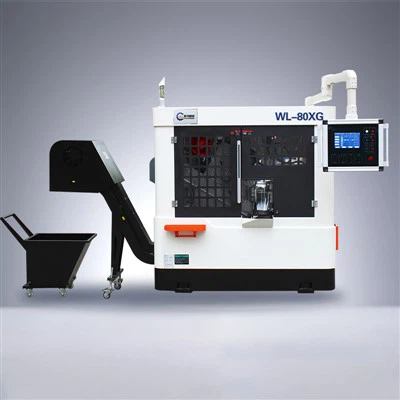
Programming a Circular Saw Machine CNC can be a game - changer for your manufacturing process. As a Circular Saw Machine CNC supplier, I've seen firsthand how the right programming can boost productivity and precision. In this blog, I'll walk you through the steps to program a Circular Saw Machine CNC effectively.
Understanding the Basics
Before you start programming, it's crucial to understand what a Circular Saw Machine CNC is. A CNC (Computer Numerical Control) circular saw machine uses computer - controlled systems to automate the cutting process. This means that instead of manually operating the saw, you can input a set of instructions into the machine's computer, and it will execute the cutting tasks with high accuracy.
The main components of a Circular Saw Machine CNC typically include a circular saw blade, a motor to drive the blade, a control panel, and a computer system. The control panel allows you to input commands, and the computer system interprets these commands and controls the movement of the saw blade.
Getting Familiar with the Machine Software
Most Circular Saw Machine CNCs come with their own software. The first step in programming is to get to know this software inside out. Start by reading the user manual. It might seem boring, but it's the quickest way to understand all the features and functions of the software.
The software usually has a graphical user interface (GUI) that makes it easier to input commands. You'll be able to see a virtual representation of the cutting process, which is super helpful for visualizing how the machine will operate. You can draw the shape you want to cut, set the dimensions, and specify the cutting path.
Designing the Cutting Path
Once you're comfortable with the software, the next step is to design the cutting path. This is essentially the route that the saw blade will take to cut the material. There are a few things to consider when designing the cutting path:
- Material Type: Different materials require different cutting speeds and feed rates. For example, cutting through metal will be different from cutting through wood. Make sure to adjust the cutting path settings according to the material you're using.
- Cutting Order: Think about the order in which you want to make the cuts. Sometimes, making certain cuts first can prevent the material from shifting or getting damaged.
- Tool Compensation: The software allows you to set tool compensation. This takes into account the thickness of the saw blade, ensuring that the final cut dimensions are accurate.
Inputting the Program
After designing the cutting path, it's time to input the program into the machine. This is usually done by connecting the computer with the software to the CNC machine. You can transfer the program via USB or a network connection.
Once the program is transferred, you'll want to do a dry run. This means running the machine without any material to make sure that the cutting path is correct and that there are no errors in the program. During the dry run, watch the machine closely and look for any signs of improper movement or potential collisions.
Adjusting the Settings
Even if the dry run goes well, you might still need to make some adjustments. The most common settings to adjust include:
- Cutting Speed: This is the speed at which the saw blade rotates. A faster cutting speed might be suitable for soft materials, while a slower speed is better for hard materials.
- Feed Rate: The feed rate is how fast the material is fed into the saw blade. Adjusting this setting can affect the quality of the cut and the lifespan of the saw blade.
- Depth of Cut: You can control how deep the saw blade cuts into the material. This is important for making precise cuts, especially when working with multi - layer materials.
Testing and Troubleshooting
Once you've made all the necessary adjustments, it's time to test the machine with the actual material. Start with a small piece to see how the machine performs. If the cut isn't as clean as you'd like or if there are other issues, don't panic.
Here are some common problems and solutions:
- Rough Cuts: If the cuts are rough, it could be due to a dull saw blade or incorrect cutting speed. Try replacing the blade or adjusting the speed.
- Material Burning: This usually happens when the cutting speed is too fast or the feed rate is too slow. Adjust these settings accordingly.
- Inaccurate Cuts: Check the tool compensation settings and make sure that the program is correctly inputted.
Benefits of Programming a Circular Saw Machine CNC
Programming a Circular Saw Machine CNC offers several benefits:


- Increased Productivity: Once the program is set up, the machine can run continuously, making cuts much faster than manual operation.
- Higher Precision: CNC machines can make cuts with extremely high accuracy, which is essential for industries that require precise parts.
- Consistency: Every cut made by the machine will be exactly the same, ensuring consistency in the final products.
Related Products
If you're interested in different types of circular saw machines, we have a variety of options. Check out our Small Cutting Sawing Machine for smaller - scale cutting tasks. We're also a Circular saw machine manufacturer offering high - speed metal circular saw machines. And for automated cutting processes, our Automatic Circular Saw is a great choice.
Conclusion
Programming a Circular Saw Machine CNC might seem daunting at first, but with the right knowledge and a bit of practice, you can master it. As a supplier, I'm here to support you every step of the way. Whether you're a small - scale workshop or a large - scale manufacturing plant, the right programming can take your cutting operations to the next level.
If you're interested in purchasing a Circular Saw Machine CNC or need more information on programming, don't hesitate to reach out. We can have a detailed discussion about your specific needs and how our machines can fit into your production process.
References
- Machine Tool Handbook: A comprehensive guide to the operation and programming of various machine tools, including circular saws.
- Manufacturer's User Manuals: The user manuals provided by the circular saw machine manufacturers are invaluable resources for understanding the specific programming requirements of each machine.